
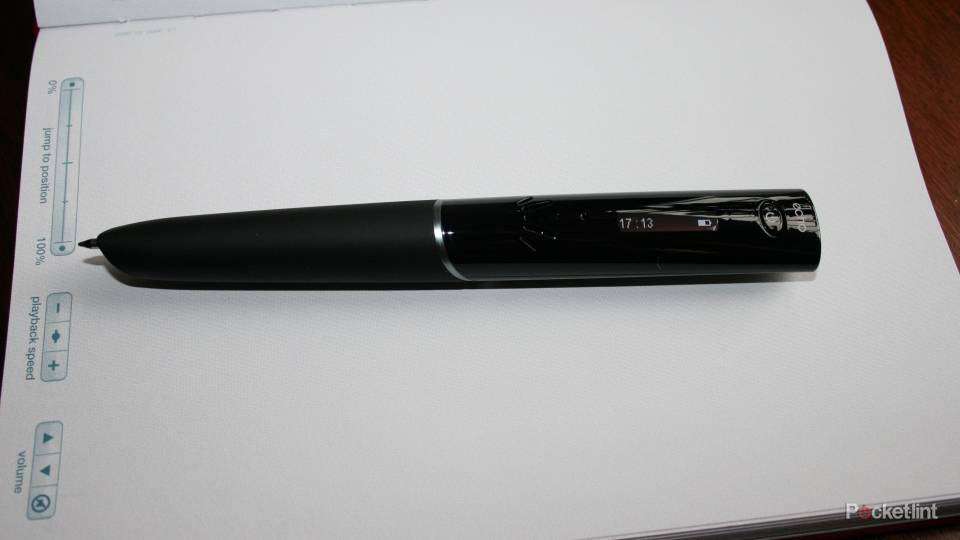
If you're not familiar with the Livescribe smartpen setup, allow us to fill you in. The Echo is the follow-up to the Pulse and, like its predecessor, contains a camera that is capable of shooting over 70 frames per second.
Our quick take
If we had to find fault in the Livescribe Echo it's easy to lament the lack of Wi-Fi - having to plug in to send your Pencasts to the desired web portals is a bit of a pain, and it would also be nice if there was a handwriting to text option straight out of the box. But we think that even those criticisms are a tad harsh on a device that delivers on every promise that it makes.
The original Livescribe Echo smartpen was a fantastic device, even before the addition of the Livescribe Connect features and those extras only serve to make it even more desirable. And, at less than £100 for the 2GB version, it's a very affordable gadget that is useful in so many situations.
The beauty of it is that it just works. Hardly ever do you you tap on a note to no effect. It's just so accurate in its playback duties. The speaker on the pen is loud enough that you don't even need to worry about making use of the optional headphone socket, or uploading to your PC. We've used the pen in a wide range of situations, from one-on-one interviews, to conference room briefings, to keynote presentations in grand hotel rooms full of hundreds of people. And it works every time, exactly as you want it to.

Livescribe Echo 8GB with Livescribe Connect - 4.5 / 5
| FOR | AGAINST |
|---|---|
|
|
Working in tandem with specially designed paper that has thousands of tiny dots on it, the camera records the dots that you connect and then can recreate those marks, digitally, on your computer using software that decodes the pictures. This clever method allows smartpen to know exactly where the pen tip is on any given page.

You get a starter pad of paper in the box, but you can also print your own using a Adobe PostScript compatible, 600dpi, colour laser printer. Which is nice, for a lower cost alternative, and for testing.
The smartpen's location, derived from the coordinates, is interpreted by software, and mapped to an app in the smartpen. The camera does not see ink written by a user, nor does it see artwork on a page. Rather, the smartpen tracks and remembers where ink is written, and knows the coordinates of items such as buttons. It can then take these memories and associated them to the sound recordings that the included microphone picks up at the same time.
Ideal for meetings
So, if you're in a presentation and the speaker says something interesting, simply write a word down to remind you of this comment and when you tap that word later, the recording from the moment you wrote it will play through the Echo's speaker. You choose to slow the speed down, speed it up or play at normal speed and there's even a timeline on the Livescribe pads for easy navigation.

What's new with the Echo, in the UK at least, is the availability of more budget friendly 2GB and 4GB Echo pens - priced at £99.99 and £149.99 respectively - to live alongside the premium 8GB version. These pens perform in exactly the same manner as the 8GB version being reviewed here – apart from the obvious difference in storage space. Still, with over 200 hours of recording possible on the smaller version and double that for the 4GB one, you're still unlikely to struggle for space. Especially as you can dump recordings onto your computer, or even the 'cloud'.
The Livescribe Echo comes packed with the standard dot pad, an interactive start-guide that will teach you the basic functions, a tips and tricks guide, two caps, two ink cartridges, a micro-USB cable and free access to the Livescribe desktop software. The Echo does away with the docking station that accompanied the Pulse.
Online connectivity
What's also new is the new connectivity options for your notes and recordings - Pencasts, as Livescribe calls them - following the launch of Livescribe Connect back in May. Livescribe Connect means your notes and recordings aren't simply confined to the memory of your pen, or the Livescribe Desktop software. Simply by drawing a quick line and writing an instruction, which you pre-program using the desktop software, you can ping across notes to a number of online portals, or even direct to your PC as an interactive PDF (supported in the latest version of Adobe Reader). The notes are sent once the pen is connected to your PC via USB, but we do think it's a shame there isn't Wi-Fi connectivity to automate this process, but that would mean a bigger price-tag, and possibly a bulkier pen.
The choices of connector are as follows; email (using Microsoft Exchange, Gmail, Hotmail, Yahoo Mail Plus or AOL), Google Docs, Facebook, Evernote and mobile apps (including iPad). Livescribers will also have access to MyLivescribe Connector with 500MB of free online storage for their pencasts. With the 2GB version you'll get free access to send pencasts to your computer, Evernote, Facebook, MyLivescribe account and mobile devices and with the 4GB and 8GB devices you'll get access to Connect Premium which throws in email and Google Docs compatibility too. Free version users can upgrade to Premium online for $14.99.

The Echo pen itself isn't the sharpest looking pen that you're likely to come across – but if you can bring us a Parker or another stylish biro with even half the capabilities of Livescribe's effort we'll eat our hat. The build is sturdy and the soft rubber grip feels nice in the hand meaning that even though the Echo is probably a bit more lardy than your traditional Bic (it weighs 36g and is 19.7mm thick at its fattest point), it is still comfortable to use – even for long periods of times.
It's got apps too
But it is brilliant, and that's not a word that we use lightly. It makes note taking such a doddle and, even if you don't use any of the Connect features, or any of the apps (some premium, some free) that are available in the Liverscribe app store, you're sure to be astounded by just how remarkable the Echo is. We were big fans of its predecessor, the Pulse, but the Echo is even more accurate and contains even more useful applications.
There are also some neat little features that probably don't evoke the wow factor quite as much as the playback options, or some of the apps. You'll be blown away by the piano demo and the language translator apps, but the battery gauge, calculator and the storage space checker are all very clever, and work by you simply tapping an icon in the cover of your Livescribe notepad.
To recap
A superb device that will revolutionise your note taking, online features are brilliant and PDF document sharing, with audio, is superb for business users. Lack of Wi-Fi is the only real letdown here