
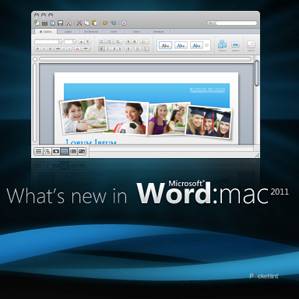
Apple will tell you that Office for Mac doesn’t need to exist, and for many, the iWork offering meets their needs. But for many Mac users, the familiarity of Microsoft Office gained in schools and the workplace is easy to cross over to the Mac - be it at home or at work. With Office for Mac 2011, the versions across platforms look closer than before, and Microsoft promises that the versions are as compatible as they can be.
Our quick take
In our time using Office for Mac 2011 we’ve found it to be noticeably faster than Office for Mac 2008. Visually we find it more appealing and it is easier to get to the options that were previously languishing in menus. Some of the features of Office:mac 2011 might not be new, but they seem more prominent and easier to get to thanks to the ribbon toolbar. If functions are easier to use, this is only a good thing for users of the suite.
We set out on this review aiming to bring you some of the details of the new software. We are sure there is plenty to discover and there will always be some things that don’t appeal to some users, and we expect there will be those that don’t find all the integration they are looking for. For us, however, Office for Mac 2011 looks much improved.

First Look
| FOR | AGAINST |
|---|---|
|
|
Many changes have been made and we’ve been using Office for Mac 2011 - which will be available on 26 October 2010 - and here is what we think so far. We say so far, because we know that a software suite like Office is used in many different ways, by many different people, for many different jobs. There will always be specific functions or questions that reviews don’t answer. Instead we look at some of the new features and point out the things that strike us. We are heavy users of Outlook and Word, so they get the lion’s share of the attention.
Word, PowerPoint and Excel all now benefit from online storage, with 25GB available via Microsoft’s SkyDrive (or SharePoint for those corporations with a SharePoint server). You’ll need a free Windows Live ID to make SkyDrive work - as you will for some of the other connected and integrated options like IM.

Outlook for Mac
Entourage never had the best reputation, with many Mac users sticking with Mail, or using the free Thunderbird client instead. For us Entourage was okay, but only okay. It was a little slow in searching, it lacked a lot of the refinement of Outlook 2007 on the PC that we were used to. Outlook for Mac only comes with the Home & Business versions of Office for Mac, the business element coming in to play with Exchange server support and support for meetings and calendar appointments, like the PC version.

It is designed to handle your email accounts, all your calendar appointments and your contacts. You can link it to your Address Book contacts, which we did, meaning you only have one port of call. You can link Address Book with your Google account, but we’re yet to see the full consequences of these syncing options. Needless to say, iSync reported conflicts, but on inspection the information appeared to be the same, and we’ve found that Outlook’s “SyncServicesAgent” has been throwing up errors too, so we’re not entirely happy that everything is perfect here. You now have Spotlight integration too, so searching for a contact will return a result from Outlook.
The Outlook calendar doesn’t offer syncing and you don’t appear to be able to subscribe to calendars elsewhere. Presumably third-party applications will make this possible, but it would have been nice to see some of the flexibility of iCal here. You can’t link to iCal, so for us the calendar becomes fairly redundant, but those who use it from the outset or have an Exchange service will probably see the benefits here, with support for meeting scheduling.

The first point of concern about using a new email client is what happens to your existing archives and accounts. Thankfully, when we started Outlook it offered to import existing information, Entourage was on the list. It then pulled over all the emails, preserving all the folders, all the settings, accounts and rules we had set up. It also took very little time to do this, and we moved about 5GB of data across to Outlook. For those looking to move from a PC - good news! Outlook for Mac will now import your PST file, so you don’t need to do a convoluted workaround to preserve your email archives when you move platforms.
The whole look and feel of Outlook is fresher than Entourage and it immediately seems like there is more on offer. One of the first features we noticed was the new conversation view in email. This groups together emails - a little like threaded emails in Gmail - that are of the same subject. There are some elements that we like immediately: you don’t have a string of emails filling the page that are all related. You can opt to expand the conversation, or by clicking on it, you see the content of that conversation and you can click on an individual message. But we were immediately struck by a flaw in the system: it will group together emails of the same subject line that are entirely irrelevant as well as duplicating conversations that are the same. Example: if you receive a number of emails with the subject line “Reviews” they will fall into the same conversation, even though they have originated from different people, at different times, about different subjects. We also found that we missed some new emails in conversation view, because they were bundled in with the others.
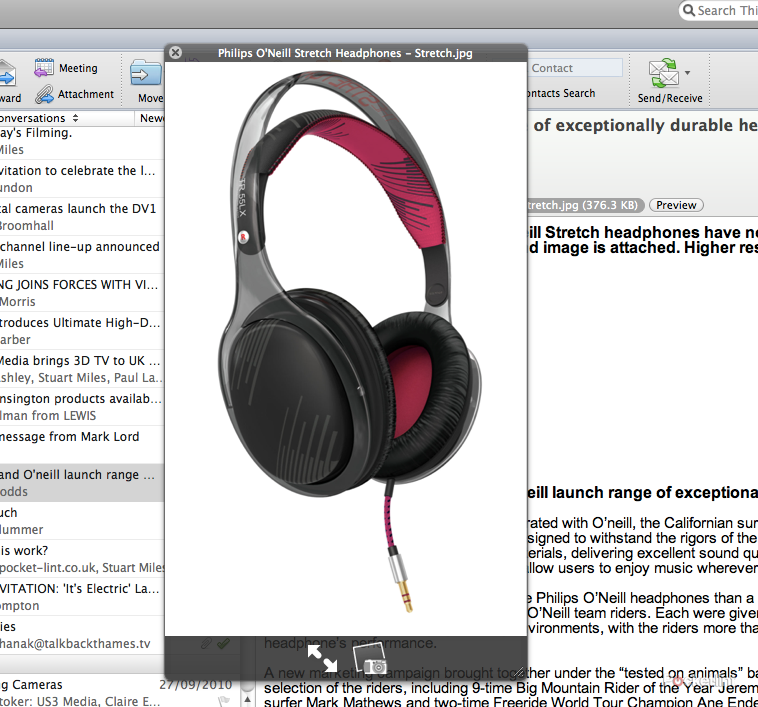
Opening up an email now gives you the option to preview attachments via the press of a button and this gives you the normal Apple Quick Look view, so you can zoom to full screen and scroll up and down documents. It makes it really quick to glance at an attachment and see if you want it, or to approve edits to a document and so on.
You can hover over the sender of an email, with a pop-up action box appearing so you can do simple things like open up their contact card. This is an easy way to add people to your contacts. If there is a minor difference in email addresses (such as .com instead of .co.uk when both work) then it won’t recognise an existing contact and we’d like to see some sort of de-duplication offering, to help manage large collections of contacts.
There are a few nice touches in contacts. From a contact card you can look up the address in Bing to see a map and you can magnify phone numbers so you have a large view - useful when it comes to calling people. There is also the option to initiate an instant message conversation through Windows Messenger, however you need to have contacts in that service to take advantage of it.
Word
The main applications in Office for Mac now get the ribbon controls that we saw introduced in 2007 for the PC. We’ve always liked these, as it means a lot of options can be grabbed at a glance. The ribbon is tab-based and you can customise it to a degree. The default options offer up home, layout, document elements, tables, charts, SmartArt and review. It isn’t essentially anything new, but whereas previously you had large icons for basic functions, you now have much more at your fingertips. We’ve found the formatting is better represented especially, where altering things like basic fonts is easier than opening the Toolbox of Word for Mac 2008, or using the Cmd + D shortcut.

A zoom control now sits in the bottom right-hand corner of your Word window, so resizing is nice and fast, but the bottom bar also offers up a new Mac-only feature which is a full screen view. Click the button and your page moves into a nice clean full screen view. Two versions of full screen are available, one for writing and one for reading. The notable thing about full screen is that the background is stripped away so you aren’t distracted by the rest of your desktop. The default setting is black, but you can pick from a range of options, including having it match your desk with various wood shades. It’s surprisingly Mac for Microsoft. In full screen view you still get your essential controls, so you can save, print, and make various formatting changes.

One of the other big changes to Word is co-authoring. We’ve seen this in action, but haven’t made use of it ourselves. Microsoft has now made it so you can work in a document with colleagues. Previously a document would be locked if someone else had it open. Now this locking is restricted to a paragraph only, so you can work on different sections at the same time. This might not be of use to the home user, but for those in business working on multi-author reports, it will be a real bonus.
Performance improvements in Word are obvious to us. Previously we found that simple things like pasting into a doc would take to long, and opening new files, especially files from Recent list just took too long. Actions in Office for Mac 2011 just seem faster overall.
PowerPoint
PowerPoint is a rude word for many, but for anyone who has to give presentations, it becomes a necessary evil. There are plenty of templates to get you started and the tools to help you easily create a presentation that isn’t just the tired list of bulletpoints you are used to. Again you get the ribbon toolbar so things are easy to get to. A new media browser will let you insert media into your presentation from iTunes, iMovie and iPhoto (you can insert from a file too and there is a healthy selection of clip art to brighten things up). Movie handling looks good, with various formatting options open to you to make things more dynamic.

One of the new features in PowerPoint is Broadcast Slideshow. This will let you share your presentation with the outside world in real time through a live browser link. It is really simple too (again you’ll need your Windows Live ID); you just select to broadcast it, the presentation is prepared and you are supplied a URL. This you can paste or email direct to the intended recipient. That person then just has to have access to an internet browser to then view your presentation. As it runs in a browser it isn’t platform dependent and the viewer doesn’t need PowerPoint. Once you end the broadcast the link goes dead.

Another nifty feature of PowerPoint (and Word) is dynamic reordering. It might sound like an astrological phenomenon, but it looks really smart. Basically it breaks the layers of your slide into a 3D view so you can move things backwards and forwards making complex slides easier to manage.
Excel
We aren’t heavy users of Excel, so we won’t pretend we’ve explored Excel as much as we have Word or Outlook, so lets stick to some of the simple features. Again you can collaborate on Excel spreadsheets in real time and share using SkyDrive.
Charts didn’t work well in Excel 2008 and never seemed as easy to manage as they did in Excel 2007 on the PC. Now however, they are both faster to render and much more dynamic, with the new Sparklines providing a simple graphical solution to make lines of figures easier to interpret.

Sparklines are single cell graphs, generated from a string of data. They are really useful for displaying trends without having to read across the raw data. For example, if you are showing an annual summary you might want to display end of year results and not have the raw data for every month. A Sparkline will neatly display a summary as a general overview to show consistent growth (or loss). They are so simple to use, we suspect they'll be really popular - even when not actually necessary.
Conditional formatting has also been improved and like Sparklines, makes it really easy to add colour gradation and the like to your spreadsheet to reflect changing values graphically within individual cells. Both these things make data easier to interpret and that's half the story for Excel - it's not just about number crunching, it's about interpretation.
To recap
From what we've seen Office for Mac 2011 looks really impressive, but we're sure there will always be those that it doesn't work for