
The SyncMaster LD220HD, like the LG W2230s, is sold as an accompaniment to your laptop, rather than as a desktop monitor, although in truth it could easily be both.
Our quick take
The Samsung SyncMaster LD220HD should be seen as a jack of all trades. It offers up the range of connectivity to suit pretty much anything you'd want of it and the TV tuner is a real benefit, letting you make the most of the space available. As such, it would be particularly suited to students or anyone living in a small space.
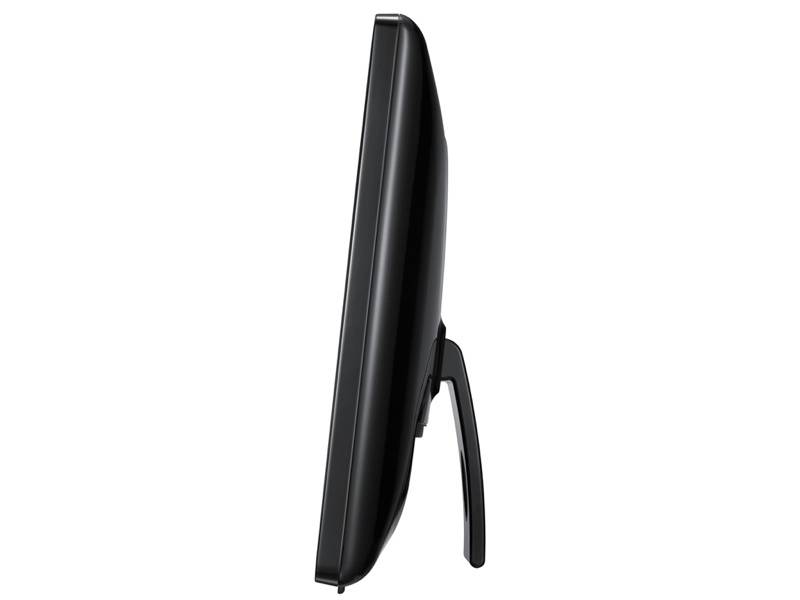
The only issue worth noting is that stand. The kickstand design means it is only really suited to sitting on a desk, set at a comfortable angle for viewing when seated at that desk. This makes it slightly less flexible for those who might want to lie in bed and watch it, for example, where the viewing angle they'll achieve might not be the optimum.
As we said, see it as a monitor first, put it in its place on a desk and it will provide you with a diverse range of features.

Samsung SyncMaster LD220HD - 4.0 / 5
| FOR | AGAINST |
|---|---|
|
|
Measuring 22 inches across the diagonal, the LD220 doesn’t have a conventional stand, instead offering a kickstand at the back to support the screen. One thing that is a little strange about the stand is that it has small rollers on the bottom and it is sprung, so you can push the monitor to a new angle, but it springs back to one position when you let go.
The design is simple. A glossy black bezel surrounds the matte screen, with two small plastic feet at the front to keep it secure and stop it scratching whatever surface you place it on.
Apart from the subtle markings and the Samsung logo, the front of the monitor appears to be free from controls, but there is a touch panel running along the bottom right-hand corner of the monitor. This firstly offers the touch power button, but also offers your input selectors, menu, volume and channel selectors. A combination of which allows for menu control at the screen itself, although a remote control is also supplied.

Around the back the LD220HD reveals its hand, offering up a selection of connections. You get the HDMI and DVI which most modern monitors support, although there is no VGA/D-Sub (a supplied cable offers a VGA to DVI connection). There is also a Scart and Component in, which are a little more unusual for a monitor, as well as an antenna connector. Audio connections will let you feed audio in through a 3.5mm cable (supplied) if your source cannot pass the audio signal over the HDMI cable. A common interface slot lies on the side.
By now it is obvious that the LD220HD has a tuner onboard as well, given away by the channel changing options and the ant in around the back. Plug in you’re your aerial and you'll find it has both analogue and Freeview tuners built-in.
We connected it up to our regular roof aerial and it had no problems offering a full platter of Freeview channels, although there is no exterior marking on either the screen or the box to indicate to buyers that a tuner is included, save for the HDTVmonitor label in the top right corner.
As a multi-function device, its strengths lie towards the monitor performance, as we found the TV picture quality to be surprisingly blocky given the size of the screen, so buy this monitor because you want the full range of functions, not just because you are after a small TV. The menus and EPG, however, owe a lot to Samsung's regular home cinema range and if you've used any of their devices in recent years, you'll find your way around without too many problems.

The touch controls offer some degree of menu access although this is somewhat fiddly, however the remote offers full control and is well laid out. It also offers auto adjustment and we found that once hooked up as a second screen, a poke of the right menu button aligned the screen with no problems.
As far as performance goes, as a general monitor the LD220HD offers good all-round performance without any glaring gripes. There are a range of settings you can tweak, but given the Full HD feed from an attached computer gave great results.
There is a matte anti-reflection finish to the monitor which means that it isn't as sharp as some glossy rivals, however the benefit is that it doesn't suffer nearly as much when used around windows or glaring overhead lights.
Speakers are mounted in the top rear of the display and whilst there is plenty of volume, it is never very natural. You'll be much better off combining it with a set of desktop speakers for better audio performance. A 3.5mm jack is available for your headphones, you could equally use it to feed audio into an Aux In on your speakers to get audio from the TV tuner.
To recap
As we said, see it as a monitor first, put it in its place on a desk and it will provide you with a diverse range of features.