
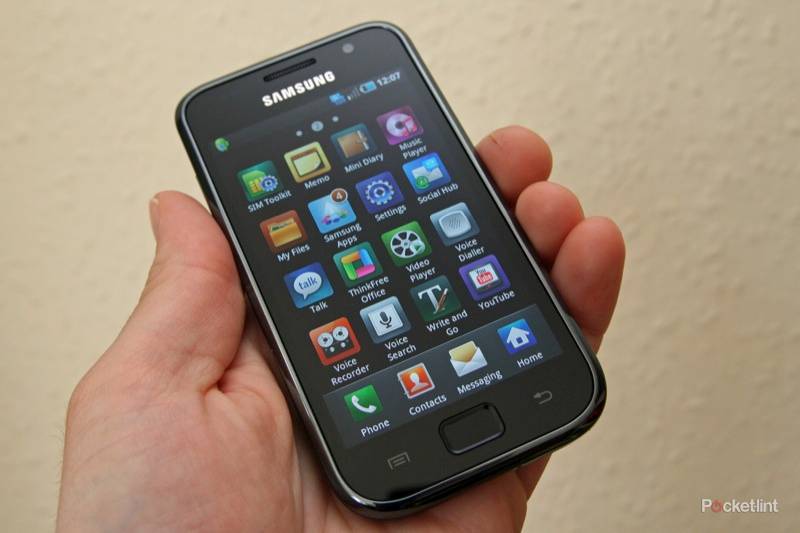
Samsung is fighting its way into the Android superphone field with the Galaxy S. With a whopping 4-inch Super AMOLED display, it's one of the biggest phones on the market. Can Samsung take on HTC in the Android market that it's done so much to define? And can it keep the nemesis iPhone 4 at arm's length?
Our quick take
The Samsung Galaxy S is certainly a competitive device, with the Super AMOLED screen being a real star, making your content look sensational. It might not be constructed from premium materials like the iPhone 4 or the HTC Desire, but we like it all the same: it is comfortable to use, a great device for consuming media.
The range of features it offers is also impressive, with streaming video being a firm favourite of ours, as it means you can simply start watching your network content with minimal fuss, whilst format support covers most bases. The camera is impressive too, competing with similar devices, although it lacks the touch focus in video that the iPhone 4 offers.
We did find some software issues and this is just about the only thing we have to pick over. There is some unexpected delay in opening apps that can (and hopefully will) be cleaned up (we made the same criticism of the HTC Hero when we reviewed that last year). The move to Android v2.2 is also eagerly anticipate as the addition of online video would complete the package in the Galaxy S. Samsung's TouchWiz 3.0 user interface adds nice touches to Android, and is easy enough to use and customise.
As it is, the Samsung Galaxy S is a welcome addition to the superphone category, proving to be a great multimedia handset that can only get better with updates. There is some space for software improvements from the review sample we tested, but as it is, the Galaxy S is a fantastic device to use.

Samsung Galaxy S - 4.5 / 5
| FOR | AGAINST |
|---|---|
|
|
The Samsung Galaxy S measures up at 64.2 x 122.4mm, but is still only 9.9mm thick. Perhaps the most immediate thing you notice about the Galaxy S is the weight. At 118g it's hardly heavy and this is down to Samsung's choice of materials. They've gone with plastics, rather than the machined aluminium or glass of notable rivals.
The result is a phone that doesn't quite have the same premium feel to it. The back does attract fingerprints due to its glossy finish, but once snapped in place, it is solid enough with no signs of twisting and no creaks as you use it.
- Best smartphones: The top mobile phones available to buy today
- A timeline of Samsung's flagship Android phones in pictures

A small bulge on the bottom rear helps give some definition to what would otherwise be just a slab, the bump sitting neatly in the palm of your hand as you hold the phone to cast your eyes across its expansive display. It also provides some grip for the fingers when holding it in landscape to watch movies or use the camera. The 5-megapixel snapper sits on the back, framed in chrome detailing.
The front is nicely done, with the 4-inch capacitive 480 x 800 pixel resolution Super AMOLED display sitting beneath a single-piece front, with a single physical home button centrally flanked by two touch controls for menus and back. The screen has the sort of silky smoothness that you'd expect from a high-end smartphone, and wipes clean of oily fingerprints easily too.
Around the body of the phone you'll find 3.5mm and Micro-USB connections on the top, a volume rocker on the left-hand side and a lock/standby key on the right-hand side.

To look at the Samsung Galaxy S doesn't evoke the same degree of interest that something like the iPhone 4 does, but the rounded edges, like the HTC Desire, make this a more comfortable device to nestle in the palm of your hand as you use it. This also applies to the top edge, which is mercifully curved, meaning the Galaxy S is also comfortable for those long phone calls.
Internally you also get a decent amount of memory, with 8 and 16GB versions available, plus there is a microSD card slot for further expansion. We tested it with a 16GB microSDHC card and it handled the wealth of media on that card without issue, although "media scanning" can take a while.
Obviously it is tricky to start anywhere other than the screen. Samsung has been shouting about its Super AMOLED display, with the tech community pitching the Galaxy S display against the Retina Display of the iPhone 4. Both displays are highly accomplished and although the iPhone has a higher resolution, we can't fault the Samsung's vibrancy and contrast. Blacks are deep, whites are brilliant, colours are vivid, making the Galaxy S a striking device to look at once you bring the screen to life.

Is it better than the iPhone 4 in terms of display? It's certainly bigger, which makes a difference, but with a lower pixel density, the iPhone 4 can produce smaller, sharper, details. Whether this matters or not will be subjective. Looking at a full webpage on the screen, the iPhone 4 renders text that you can barely read, the Galaxy S is a little fuzzy in these small details, but perhaps this is a moot point: if it is too small to read, it doesn't really matter that much. When it comes to video watching, again, the iPhone will make more of the details in your HD movies, whilst the Galaxy S will give you a larger screen to watch it on. It's an argument that's set to run: both are accomplished and we'll leave it at that.
The large screen gives you plenty of real estate to play with. Samsung has added its TouchWiz 3.0 user interface over the top of Android 2.1 in the Galaxy S. TouchWiz, as we saw on Samsung's Wave running on its Bada platform, offers up 7 home pages which can be customised to your liking, or removed if you don't want them. You can add Samsung or Android widgets, drop shortcuts and bookmarks and move the whole lot around.
Taking a leaf out of HTC's Sense UI, you get a number of services to take care of your social networking needs, so Twitter, Facebook and MySpace are all neatly pulled into your contacts (if you want them to be) and various Samsung apps offering to use your social networks in various ways.

Buddies now lets you assign favourite contacts to follow, so they appear on a Rolodex-style carousel, with their most recent status update on display and an option to contact them. Feeds and updates will show your social networks in a list type feed that is similar to HTC's Friend Stream, although if you follow any number of people on Twitter, you'll never be able to keep track.
Daily Briefing offers up AccuWeather.com, Y! Finance, AP Mobile news, and your calendar to give you a selection of pertinent information when you wake up in the morning. It's nice, but a little too inflexible and we'd like to be able to completely customise each of the sections to get a truly personal feed.
There are various other fun Samsung widgets on offer too, so you don't feel short-changed as soon as your new phone arrives. The live widgets have prominent refresh buttons, as well as being able to set the auto refresh time, where applicable. You can also change the wallpaper behind the home pages, scrolling across a little as you move through pages, just like HTC Sense does. You can assign live wallpapers, although this seemed to slow the phone down, so best avoided.

There is also a Samsung App store, joining the Android Market, offering Samsung's own applications for your device. There was only a handful available when we reviewed the phone, including a duplicate Facebook app so we'll have to see exactly how this develops in the future.
TouchWiz makes a visual change across a lot of Android, with the top pull-down menu getting large Wi-Fi, Bluetooth, Silent and Vibration icons to instantly toggle these services. Like other Samsung handsets, you also get a line of icons across the bottom of the screen offering Phone, Contacts, Messaging and Applications by default which are easily changed to your favourite apps if you want.
The Application menu is more than a little reminiscent of the iPhone's menu, but then how different can you be when you offer a selection of icons? Neatly, the Samsung interface adds a little background gloss to the applications you add to the phone, so although you are downloading from the Android Market, everything gets a little graphical treatment in the menu. It's a neat touch, making the menus looks fantastic.

The menu also shows-off the screen: the icons are like islands of colour in an inky black ocean of background, just the sort of thing that gets geeks like us excited. You can opt for a list view if you prefer, although it doesn’t make great use of space. You can re-arrange menus to your preference, dragging icons over pages and so on.
We like Samsung's screen lock, which lets you unlock it by swiping the "cover" off in any direction you fancy, and the jigsaw-type alerts that will sit on it to inform you of missed calls or messages. You can then drag to piece into the hole in the background to open the message or call list directly - pretty smart.
Internally the Samsung Galaxy S comes with a 1GHz processor which is more or less par for the course on current smartphones. It should, in theory, keep things running along smoothly, but there is some unexpected lag hiding in the Galaxy S. It doesn't struggle to fire up a 720p video, but might sometimes pause when you open the messaging window, or when you move around your contacts list. This suggests that something isn't quite right on the software front and will most likely be fixed with a firmware update in the future.
That wasn't the only issue we found with the OS side of things either. We had a large number of failures with the Android Market, applications not downloading cleanly, although we know this has been a problem for other Android users too, and may not affect all devices. The Android Market continues to gain strength all the time, although we don’t feel it is quite as comprehensive as the Apple App Store yet.

Samsung's AllShare is present, meaning you can stream your content from media server, which is where things get exciting. It happily played HD content from our server, which looks absolutely sensational on the screen. Equally, you can share content you have on your phone, which is a real bonus for those with compatible hardware especially when someone wants to show off the HD video they have captured using the phone.
The camera around the back not only offers 5-megapixel still capture, but also 1280 x 720 resolution video capture, on a par with the iPhone 4 and matching many pocket camcorders. There is no sign of an LED "flash".

The camera offers a dizzying array of settings. Shooting modes offer the usual suspects of smile shot and beauty, but there is some creative fun to be had with Vintage and Cartoon. You also get scene modes, offering up the likes to landscape, portrait, sports and so on. But the settings don't finish there. You can change the exposure compensation and then dive into more settings where you get a whole range of options, like white balance, special effects and focus mode. It might just be a little too comprehensive and too convoluted, as the focus mode should really be easier to get to.

But the results are very good, so some of the messing around is justified. Touch to focus works well alongside the autofocus which is relatively fast to detect what you want to take a picture of. In low light, naturally, noise becomes an issue along with slower shutter speeds giving you blurry pictures and it is slower to focus.
Video gives you a great result from the highest settings, with 720p video capture at around 30fps as a 3GP file. You don't get any focus controls, but it does auto-focus as you start filming. A pause function will let you string together video in different locations to save you post-processing, which is something we like, although there is a focus twinge at the start of each new section.
Overall the results from the camera are great, it's fun to use, there is plenty to play with before you look at sharing your results - either by sending out via social networks or email, streaming, or via TV out onto the big screen. There is also a forward-facing camera with a 640 x 480 pixel resolution, although access to it is limited to the "self shot" shooting mode and video calling.
Music is handled well, with the bundled headphones being better than average, but no contest for a decent set of third-party alternatives. The music player offers various different methods of viewing your collection, including a Cover Flow-style carousel. You also get controls whilst the screen is locked via a drag down CD image (of the cover art no less) so you can skip and pause music. Volume can also be changed when the screen is locked. The radio auto-tunes, letting you preset your favourite stations and works nicely, with controls moving into the down-down menu when you move away from the app.

Video playback is one of the phone's strong points, as it supports a wide range of formats, including DivX, AVI, MKV, MPEG4 and FLV in various forms. Not all codecs are supported in their various containers, but we played a range of video files in both HD and SD without issue - you certainly get more variety than many rival devices. Watching videos on the large screen is fantastic, although we found that it didn't remember where we had paused videos on resume, so we had to skip back through them again to continue watching, a minor point.
Connectivity is, as you'd expect, excellent. You have HSDPA for fast data on the move, joined by Wi-Fi b/g/n, the new Bluetooth version 3.0, GPS, and proximity and motion sensors. Google Maps from the GPS offers up multi-touch zooming, as well as free navigation from Google Maps Navigation, as crude as it is.
Multi-touch support is a great benefit for the browser, which we found was fast to navigate, reflow text and zoomed and scrolled smoothly. One thing that didn't seem to work on our device was embedded YouTube videos, so we were left with no web video at all. This may not be a problem with the forthcoming update to Android v2.2, bringing with it compatibility for Adobe Flash video. Samsung has promised the update this year, but as we've seen in the past, this isn't necessarily any guarantee. The sheer space and the proficiency with which websites are handled makes the Galaxy S a great handset for browsing the Internet, video or not.

Of course the on-screen keyboard is essential. Once we'd got rid of the touch tones and the haptics, we found the Samsung QWERTY keyboard allowed for fast and accurate text entry in both landscape and portrait modes. Predictive text and corrections come courtesy of the XT9 system. This can be a little overwhelming, offering up suggestions of the next word in your sentence which can be confusing at first, but you do get used to it. You can also customise the system and switch this off, which we found more acceptable.
Samsung has also included Swype. We're seeing Swype on a growing number of Android phones; it's a system that lets you "type" by moving your finger across the keyboard to string together the letters. It works well for basic text entry, with clever suggestions. It's another skill to master, but we like it. Again, the choice is yours, so if you don't want it, you don't necessarily need it.
The important thing we found about text entry on the Galaxy S was that it was unhampered by other lags in the system we found elsewhere. It may have taken a moment or two to open messaging, but once we got there we could lay down text very fast indeed. The screen is certainly up to the job.
When we had the phone in use, we noticed that the top half became warm, as it did when charging the battery. The battery life is a little poor and you'll certainly have to charge this phone every day. Life from the 1500mAh cell will depend on what you do with it, how bright you have the screen, background syncing and so on, but you do pay the price for the slim dimensions and the wealth of power-hungry hardware.
To recap
As it is, the Samsung Galaxy S is a welcome addition to the superphone category, proving to be a great multimedia handset that can only get better with updates. There is some space for software improvements from the review sample we tested, but as it is, the Galaxy S is a fantastic device to use