
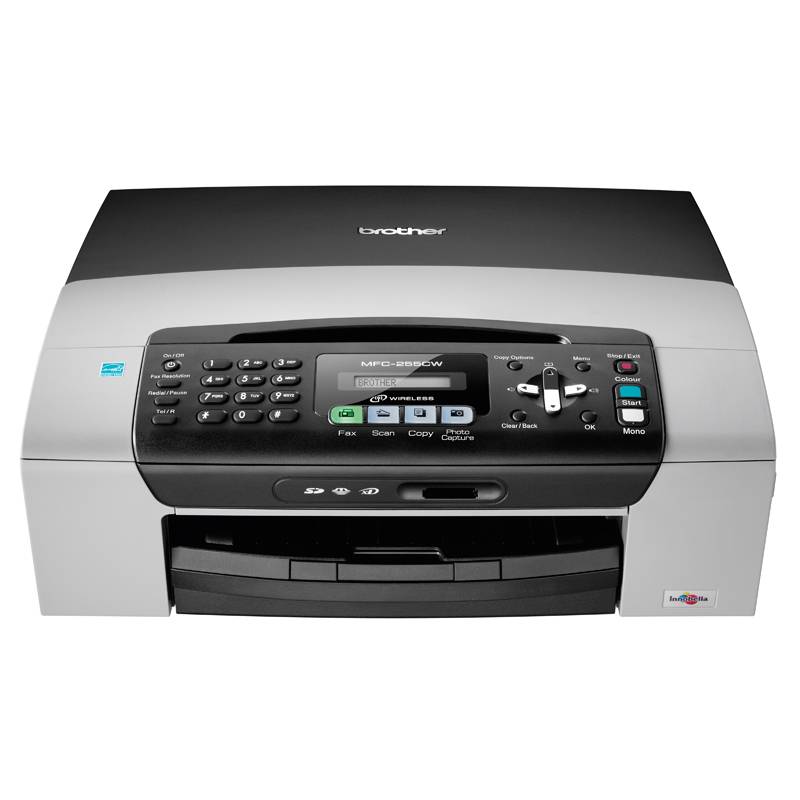
The Brother MFC-255CW lives up to its "multifunction" name by offering printer, scanning, copying as well as fax functions, making it the sort of printer that should appeal to those who work at home or run a small office. Thrown into the mix are photo printing capabilities, which might appeal more to the home users than those in an office.
Our quick take
The Brother MFC-255CW lives up to its multifunction ambitions with fast enough copying and printing for daily home office tasks. The inability to accept standard USB drives is a slight drawback of this model, but the easy scanning to PC or memory card can quickly step around that.
Results are good in all areas once you step up to the higher print settings, whish speed is maintained at lower qualities for draft printing. The footprint is a little larger than many rivals, so if you don't need to regularly use a printer, it may take up more desk space than is absolutely necessary.

Brother MFC-255CW all-in-one printer - 4.0 / 5
| FOR | AGAINST |
|---|---|
|
|
It has a relatively large footprint as it encases the paper tray which fits into the bottom of the printer. It measures 390 x 365 x 150mm, but the larger dimensions mean that printed paper doesn't project excessively in front of the device, only 50mm or so is visible. Paper feeds from the tray on the bottom, through the printer to lie on top of the paper tray when finished.
The top sections of the printer open in two stages. The bottom section opens to reveal the internal workings of the printer for removing jams, as well as accessing the USB port, which is housed within the device, rather than on the exterior; the second section is to access the scanner, which offers a 1200 x 2400dpi resolution.
Access to the ink cartridges is via a flap on the front, which opens to reveal the bay for the four inks: black, yellow, cyan and magenta. Installation is easy allowing individual colours to be quickly changed as necessary. Replacement cartridges (from Brother) range in cost from approx £10 for a colour tank to £18 for black, with various discounts available on combination packs. Each colour tank is rated at 260 pages, the black at 300.
Exterior connections include the power socket and telephone line for the fax functions of the printer, both on the left side. As mentioned above, the USB connection lies on the interior of the machine, with a channel for the cable to neatly run out of the back. This layout might seem unconventional, but it does at least mean you can push the printer right up against a wall without having to worry about cables hanging out of the back.

Control of the MFC-225CW is via the control panel on the top. This presents an array of buttons, as it gives you the full fax dialler. The centre features a single-line LCD display, which relays the printer's status, as well as displaying your options as you navigate the menu. Compared to the move towards larger LCD displays, it isn't the easiest to navigate, if you are going to be changing settings on the printer itself, rather than via the connected PC.
The MFC-225CW is a network printer, offering a wireless connection to your network. Setup is simply a case of entering your network password once it has detected your network, a process that took us about 2 minutes. Connection is also offered via USB (cable not supplied).
We tested the MFC-225CW with both Mac and PC. Drivers are supplied for both, however the bundled discs don't contain the latest Snow Leopard support for Mac users, so you'll have to download the drivers from the Brother website. An additional disc if supplied for users of Windows 7, but setup on both PC and Mac was straightforward.
Printing is cited at 25-30 ppm depending on whether you are printing colour or monochrome pages. In reality we found that casual printing would give us about 10 pages of text a minute. Moving over to photo printing, an A4 image on the highest settings took just under 10 minutes; a 6 x 4-inch photo print took 1min 30sec. Borderless printing is available, with great results for home printing.
The "photo" printing mode didn't capture the subtle details in a sunset test shot we printed at A4 where the "high quality" mode coped much better. Prints were free from banding, showing a great consistent quality overall. The colours can be a little muted, with a "vivid" option allow you to saturate those colours a little more if you prefer.
Scanning provides four main options: scanning to file, email, OCR and image (or an inserted memory card). You'll need to have support for these various options on the computer you are scanning to, for example, you'll need OCR software to enable that option. Scanning from the device itself is simple, allowing you to select where you are scanning to - i.e., your connected computers. Scanning results are a little weak on colour at the lower settings with good results at higher settings. Copy duplicates the scan options outputting the results to paper.
The front of the MFC-255CW sees a card reader supporting SD/SDHC, MemoryStick and xD-Picture Cards. From here you can print directly, although without a screen to preview, you'll need to print off the index sheet and use the corresponding photo numbers to get the image you want.
You'll also be able to scan to an inserted memory card, with the option of selecting the scan quality and file type at the MFC-255CW, so it enables PC free operation for some tasks.
The fax options will appeal to office users and those who need "sign and fax back" various documents. You get the option for speed dial settings for those who are going to fax regularly, an external TAD interface if you have a standalone answering machine and automatic recognition or telephone and fax messages on shared lines.
To recap
Results are good in all areas once you step up to the higher print settings, whish speed is maintained at lower qualities for draft printing. The footprint is a little larger than many rivals, so if you don't need to regularly use a printer, it may take up more desk space than is absolutely necessary