
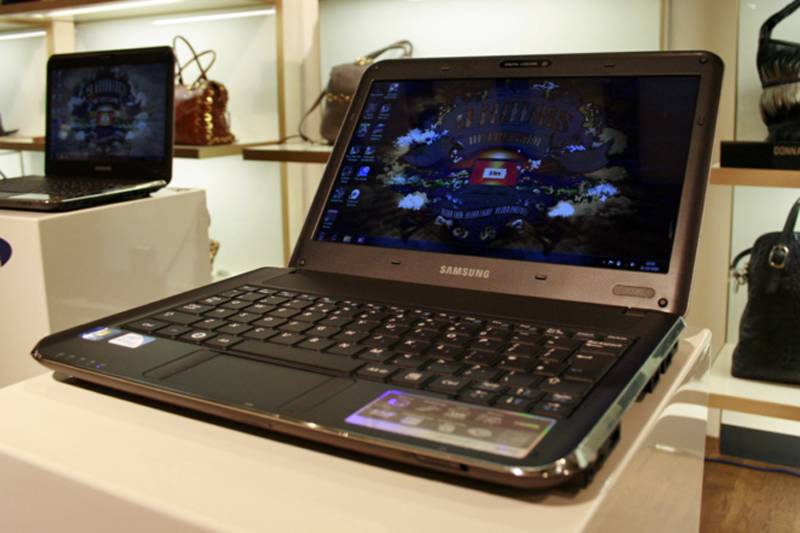
With a very compact design, small screen, cheap price and no optical drive, it’s easy to think of the Samsung X120 as a netbook. Look at the specs though, and it’s a no-brainer - the Samsung beats most netbooks hands down - but does it deliver in other areas?
Our quick take
We like the Samsung X120. With netbooks all offering the same specifications, and prices rising rather than falling, this product is a refreshing change. There’s enough performance to use for regular home and office tasks, and although it’s still not the fastest machine it features a great specification for the price.
It also provides excellent quality, the screen is top-drawer, and it offers a high-end ultra-portable experience that’s out of sorts with the budget price tag. If you’re on the lookout for a compact machine, then the Samsung X120 is highly recommended.

Samsung X120 notebook - 4.5 / 5
| FOR | AGAINST |
|---|---|
|
|
The 11.6-inch screen is a stunner, for a start, offering incredibly crisp images and excellent colour reproduction. With a 1366 x 768 pixel resolution, there’s enough space to work with a couple of windows open simultaneously - unlike on the vast majority of netbooks - and it’s also great for movie playback. This is also an area in which it copes fine - the integrated Intel GMA 4500M chipset running films without dropped frames.
The X120’s distinctive design features a lip that runs around the edge of the chassis - with the interface sitting slightly lower. It looks great, and with the lip fitting snugly against the screen lid, there’s no chance of anything falling between the display and keyboard when you’re on the move.
The unusual design stretches to the keyboard location, which sits smack in the centre of the chassis with a lot of vacant space above it. As a result, the palm rest is very small, leading to your hands sitting on the desk or hovering as you type. There are no touchpad buttons below the touchpad - they’re located on each side instead, which takes some getting accustomed to.
The keyboard is excellent, with a design reminiscent of Sony’s previous-generation VAIO laptops. The centres are raised, with a slight dip around the edges that makes it a bit easier to type. The keys are well attached and very comfortable to type on, providing a good travel, although it’s not the quietest board during use.
Instead of an Intel Atom processor, you’ll find a CULV Intel Pentium chip running at 1.3GHz. A dual-core chip, and backed by 3072MB of memory, it offers far better performance than you’ll find in similarly priced netbooks, with the ability to multi-task without too much lag. A battery life of around 3 and a half hours is reasonable, although those looking for all-day use will be disappointed.
All three USB ports are located on the right-hand side of the chassis, although with a large amount of space between each one you’ll be able to connect bulky peripherals without fear of blocking the other ports. On the left side, Samsung has fitted both VGA and HDMI ports. There’s a memory card reader on the front, where the power button is also hidden.
To recap
Offering double the specification of most netbooks, at a similar price to high-end models, the Samsung X120 provides outstanding value for money