
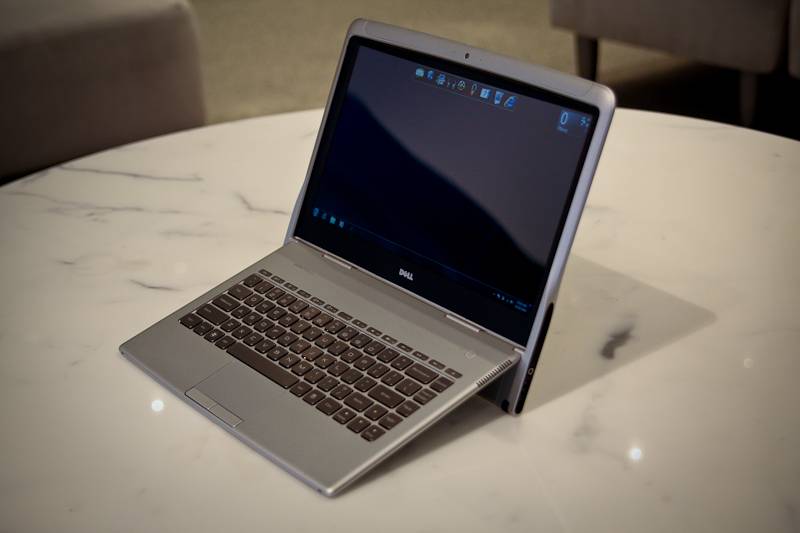
How thin is thin? That's the question Dell has asked itself with the launch of the Dell Adamo XPS. The answer it seems is 9.9mm, but has the journey to make a laptop thinner than a CD jewel case meant corners have been cut? We grabbed a gander at the new model ahead of the official announcement.
Our quick take
Our play was brief, which is why this First Look focuses on the hardware and design implementation rather than speed and performance of the laptop in a real-life situation.
As we move away from CDs and DVDs the need to have an optical drive isn't as vital as it once was. We can't actually remember the last time, apart from installing the OS, we actually used our laptop's optical drive anyway.
There is a concern that the battery life will be the Achilles heel here, but at least you can replace or swap it out if you are attempting a road warrior moment. Yes it should last longer, but that is clearly a payoff to the size and weight. There is a larger 40WHr battery that promises 5 hours 17 minutes.
So what's the bottom line? If you want to impress, this is clearly going to be the device to do it with. The decision to give it a powerful processor over the Intel Atom offering and the ability to swap out the battery, for us, makes this one to watch if you are after style and want substance.

Dell Adamo XPS notebook - First Look
| FOR | AGAINST |
|---|---|
|
|
The first thing you'll be thinking is "where did it all go?" the Adamo XPS is thin, very thin. To get an idea of how thin it really is you need to stop reading for a second. Yep you heard that right. Now go find a CD jewel case you've probably got floating around the office or your house and awe that a computer can be thinner. At its thinnest point it's 9.7mm at its thickest its 10.3.
To give you the full dimensions they are 340 x 273.9 x 9.9mm with a weight of 1.44kg. To achieve that thinness, Dell has done something drastic, it's taken the keyboard and made it fit into a recess the size of the 13.4-inch screen.
In real terms it means that the hinge isn't at the base of the screen, as it is in normal laptops, but slightly further up - say by about 100mm (see pictures). The payoff in placing the hinge higher up in the design is that the metal chicklet keyboard doesn't actually sit flat on your desk - a rather strange experience - but at a 30 degree angle. In use it's surprisingly comfortable and reminiscent of how keyboards used to be before they became super flat.
Back to that design and you'll find that when folded, the keyboard slots into a recessed screen area, allowing it to claim the overall thinness and enabling you to gloat at your friends. It's very clever.
To keep things to a minimum the Adamo XPS isn't loaded with ports, sockets, buttons or other paraphernalia. You get a DisplayPort socket, power socket, headphone, line out jack and two USB ports that are neatly placed down either side. Like the MacBook Air, it loses the Ethernet socket as well as an optical drive, both of which (Blu-ray included) are offered as external devices.
Aside from the ports, the laptop is fairly void of detail. The aluminium casing oozes MacBook Pro chic. Big brash logos are left to be etched into the underside of the device rather than blazoned on the back of the screen. There is branding of course, but it's small and discrete, just like the button to open it.
We say button, though that's not strictly the case as there isn't actually one. Instead you'll be expected to stroke your finger in a certain place to release a latch. What happens when the power runs out? You can't open the laptop, but then Dell's response is logical - why would you want it open, the battery is dead.
Back to the underside and you get a couple of fan holes, a webcam and a removable battery that Dell says will give you a rather disappointing 2 hours 36 minutes. Those looking to hit the road should go elsewhere.
So we've got past the design, but is that it? Luckily not. The specs read quite nicely too.
The glossy screen is a 13.4-inch HD WLED 720p (1366 x 768) offering, while Dell has turned to Intel bringing its Intel Core 2 Duo ULV (1.4GHz) processor to power this size-zero machine. Memory comes in the guise of 4GB DDR3-800MHz and the hard drive is a Solid State 128GB model as standard.
XPS might have been Dell's gaming line once, but no more. With an Intel GS45 integrated graphics card, this isn't going to be a gaming machine, but then gamers are not the target here. Dell has confirmed to Pocket-lint that XPS now means power over gaming and with the Alienware brand going strong they've got that market sector covered.
Connectivity is offered via Wi-Fi a/g/n standard and there is Bluetooth 2.1 in there too. Power the machine up and you'll get Windows 7 Ultimate edition as standard. Windows 7 is leap years ahead of Windows Vista or XP and therefore by no means a negative.
To recap
One to watch if you are after style and want substance