
If I asked you to describe a mouse you would either tell me it's a small rodent or you would tell me it's an input device for a computer that has two click buttons and a scroll wheel.
Our quick take
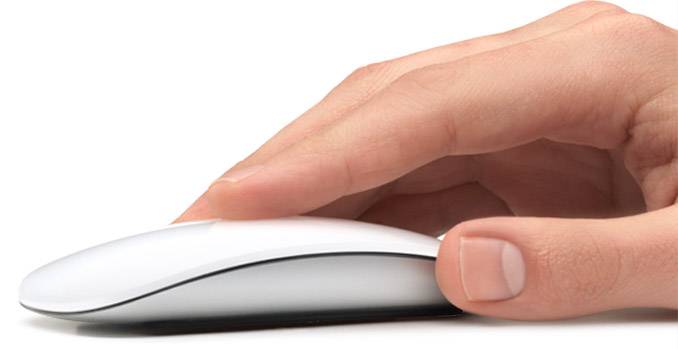
So what's it like to use? Well so far so good, although it's by no means perfect. The lower than expected profile means that it won't sit comfortably in the palm of your hand like those made by Microsoft or Logitech and that for some will either be a good thing or a bad thing. We can see why Apple has done it - sweat. Anyone that gets hot hands knows that pressing it against a bit of plastic isn't that nice. Here you don't get that sweaty palm feeling which is nice. It also means that you feel like you are controlling something rather than the mouse becoming an extension of your arm - borg style.
While the laser sensor is very accurate and fast, the black strips on the underside seemed to grate on a desk or mousepad. It's not a massive complaint, but considering the smoothness of the flicking action from the touch controls we aren't 100% happy with it - maybe only 90% happy. We also suspect that it could pick up dirt quite quickly.
Worth the $77 or £55? In short, no.
This is a nice idea and one we were very tempted by when we heard the news. While touch certainly is the future of the mouse, the Magic Mouse isn't that future just yet, well not unless all you are interested in is scrolling up and down with your finger.

Apple Magic Mouse - 3.5 / 5
| FOR | AGAINST |
|---|---|
|
|
The creation of the scroll wheel re-invented the way we interacted with computers. The wheel allows us to move quickly through long pages at the spin of a wheel. But its time in this world could be over if Apple has anything to do with it.
In steps the Magic Mouse (they lost the Mighty Mouse name in a trademark issue) professing to be the end all to your mousing issues, not that you realised you had any.
Rather than buttons or a scroll wheel to mess up the smooth lines, the Magic Mouse looks more like a pebble or one of those Philips "personal" massagers than your average mouse. A gloss white plastic moulded piece of plastic sits on a aluminium base: there are no buttons, no indents, no wires.
In reality there are two buttons - left and right click - while the scroll is done by touch. That's right - the technology found in the trackpads for the MacBook and MacBook Pro line has found its way into the mouse so you can flick your way down pages.
The concept is simple and the execution for downward scrolling incredibly simplistic. Strangely your finger knows exactly what to do.
Not so easy is left to right scrolling. Here you have to use two fingers while somehow managing to hold the mouse underneath still. As the mouse isn't that heavy - the main weight comes from the two AA batteries - it's an awkward affair. Still if you can master it, you can scroll forward and backward through internet pages in Safari for example, which can be quite handy.
The mouse doesn't support rotating, or other features at the moment, but that might change with later software updates, who knows?
What do you get though, is plenty of control options within the mouse management software. Not only can you adjust the tracking, but the scrolling and double click speed, you also get to determine whether the scroll comes with momentum or not.
Back to the hardware, and rather than opt for a wired option that would take away from the "magic" Apple has opted for Bluetooth to connect the mouse to your Mac. With all Macs now shipping with the wireless technology you shouldn't have any issues to connecting to your computer. Apple say you'll get around 4 months battery life from the two AA batteries hidden inside, we aren't going to wait 4 months to test it out, but that's comparable with other mice on the market.
To recap
This is a nice idea and one when we heard the news very tempted by. While touch certainly is the future of the mouse, the Magic Mouse isn't that future just yet