
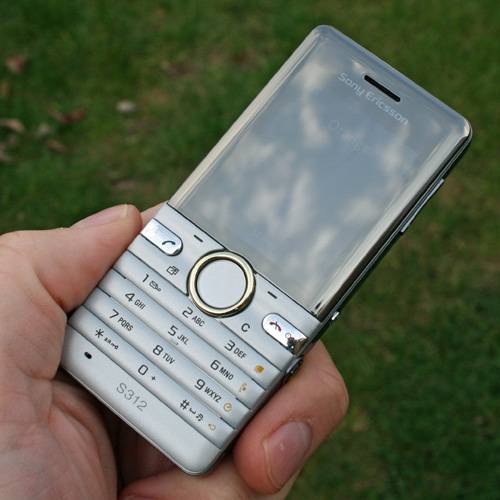
The Sony Ericsson S312 is pitched as an entry-level handset, with a few added touches that bring the camera to the fore. But is this a viable camera phone, or does it struggle to drag itself out of the bargain basement?
The S312 is a typical candybar phone from Sony Ericsson, with the screen occupying the top half and the 12-key keypad the bottom, with the usual shortcut keys across the middle. It is relatively compact, measuring 100 x 46 x 12.5mm and weighing 80g.
It feels a little light in the hand, a little too light perhaps. That said, the weight is something of a problem and probably not for the reason you'd think, so bear with us. The choice of materials used for the S312 matches its budget status, but takes it in the wrong direction: it feels cheap, but sitting on the table it looks pretty snappy. The plastics are smooth and lack any sort of tactile properties, so we dropped the phone a couple of times as it slipped through our fingers.
This cheap feeling rolls over the keypad too. The buttons have a distinct enough click to them, but as a phone it doesn't feel great to use: if you are an avid texter looking for an affordable device, you might find this doesn't really suit.
The design of the two shortcut buttons under the screen is rather odd too – the text at the bottom of the screen which they refer to is never in line with the part of the button that actually moves and "clicks" to confirm that action. You get used to it, but it does feel a little funny.
Moving around the handset you find the first glimpses of another purpose to the handset: using the camera. Around the back is a 2.0-megapixel camera, with a small LED light in place of a flash. The right-hand side also sees a dedicated shutter button, a video button and the volume rocker, which doubles as a zoom for the camera.
The zoom is digital, so isn't worth using – you are better off sticking with the full resolution and cropping the image to get the detail you want later, or just taking two steps forward. The video button is interesting as this is something of a unique feature. It means that you don't have to dive into the settings, select video, and then start shooting, so you might be more likely to capture whatever it was you wanted.
Along the side of the keyboard (on the 3, 6, 9, # keys) are further shortcuts pertaining to the camera. You get continuous or single shot toggle, white balance, self timer and the option to turn the LED "flash" on and off. There is no auto mode for the flash, just as there is no autofocus – it is a fixed focus camera.
The LED flash is only really useful for finding keyholes in the dark, as it lacks any power to illuminate the subject – when it does, it results in a nasty blue-ish cast over everything. But the shortcut keys are useful for accessing the camera features on offer and it does encourage you to play around with these settings, rather than just accepting the defaults.
Video capture is rather lacklustre at a max resolution of 320 x 240 at a flaky 15fps. The audio capture is a little better, but the video doesn't really stand-up against any of the VGA or higher resolution devices and isn't really great for sharing online either.
The camera performance is reasonable outdoors in good light, although images are never sharp like you'd expect from a real camera. Images are fine for use online, but won't stand up to viewing at full size. The sensor does easily become overwhelmed, so high-contrast shots result in a lot of purple fringing around edges and highlights tend to be blown out. Images can be cleaned up slightly using PhotoFix, but there is no control over what it does, and the screen on the phone is really too small to judge any changes.
Images or video viewed on the phone look ok, but the screen is only 2 inches, 176 x 220 pixels, so it is pretty small. The screen is residing behind some sort of mirrored finish too, meaning that once you step into daylight, you can only really see your reflection in it. Using the phone in bright conditions, therefore, is rather difficult, and it is constantly covered in fingerprints.
The menus are fairly standard Sony Ericsson stuff, with main menu icons giving way to simple lists. The normal Sony Ericsson PlayNow is present, along with a basic browser, several Java games and a basic music player. There is an FM radio which requires the headphones to be connected.
There is no 3.5mm jack unfortunately, so you are stuck with the bundled headphones. The external speaker isn't great quality, but it loud enough to be irritating in the street.
The battery life is rated at 8 hours of talk time and 400 hours of standby time. The S312 is an GSM/GPRS/EDGE handset, which will probably be adequate for your minimal data needs. Bluetooth is also present for transferring data to or from your phone and hooking-up to speakers or headphones.
Internal memory is minimal, so if you plan to take many photos, or carry around any music or other content, you'll need to invest in an M2 card.
Our quick take
The Sony Ericsson S312 attempts to deliver a little more convenience for camera users, without really upping the results at the end of it. To call it a camera phone will only set it up for a fall: this is an entry-level handset, which unfortunately due to a few design decisions feels exactly that.
It may be cheap and if you are an infrequent phone user who just needs a handset for occasional or emergency use, then the S312 is simple and reliable. If you are a heavy phone user you might be looking for more.

Sony Ericsson S312 - 3.0 / 5
| FOR | AGAINST |
|---|---|
|
|
To recap
It may be cheap and if you are an infrequent phone user who just needs a handset for occasional or emergency use, then the S312 is simple and reliable. If you are a heavy phone user you might be looking for more