
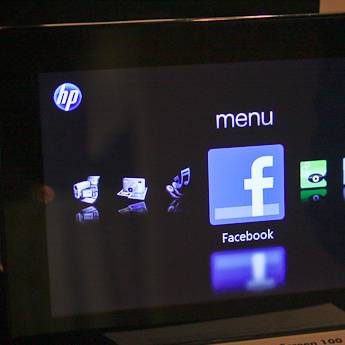
While some have pitched the HP digital photo frame as a tablet beating Apple to the punch, it's worth starting by staying this isn’t a touchscreen tablet device in the slightest.
Our quick take
Digital photo frames are two a penny at the moment with virtually every manufacturer offering what they claim in the latest and greatest ways of showing off your digital images.
Interestingly HP seems to have been able to achieve something that could prove rather exciting, in the rather dull world of digital photo frames.
Don't get us wrong, we love the concept and already have a couple (from other manufacturers) in the house, however with the Dreamscreen the shift towards a "fourth screen" is even more apparent.
With a device like this offering weather, Facebook status updates and other such social networking experiences, we could easily see a Twitter client, Spofity and other apps coming quickly.
The only downside is that without that touchscreen interface or a battery for that matter (you'll have to have it plugged into the wall), this isn't the tablet computer you perhaps want, but really just a rather impressive digital photo frame.

HP Dreamscreen digital photo frame - First Look
| FOR | AGAINST |
|---|---|
|
|
In fact talking to HP, they actually moved away from making it touchscreen based on focus group feedback saying that such a move would make the screen dirty.
Why? Because while the Dreamscreen can and will let you do more things that it perhaps should, its core principle function is to be a digital photo frame, and from our brief experience of it, a very good one at that.
There are two models in the range, the Dreamscreen 110 which is a 10.2-inch LED backlit model and the Dreamscreen 130, a 13.3-inch model with standard LCD tech. From a software point of view both are identical in their offering. It really is just screen size and screen technology that stand them apart.
In reality that means that the smaller screen comes across more vivid, brighter and crisper, but it's not a deal breaker for either device.
What it is not, is OLED. HP say that it would be possible, but cite costs for not choosing that technology. Rather than a mind-blowing screen as found in the Kodak OLED offering, instead you get a frame packed full of features.
Around the back both models feature a memory card reader for all the usual formats. There are no surprises and all major formats are supported. Failing that you can also store images on the 2GB of internal memory or furthermore stream photos and videos via a PC over a wireless network as, yep you guessed it, the frames sport Wi-FI connectivity.
Streaming support is currently rather limited, however HP say they have big plans. Those plans include NAS drive and Media Server support as well as Mac however, the latter not really being a focus for now.
Everything is controlled via a touch sensitive panel on the front of the unit, which is simple and responsive. When not in use the buttons disappear into the gloss black frame. We say frame, but like the company's new Envy range of laptops, the front of the digital photo frame is a single piece of glass. Unlike Kodak you won't be adding your own frame to this unit.
Failing the touch sensitive buttons, you can also use the included credit card sized remote control that rather nicely slots into the back of the frame when not in use. It's a nice touch and will save you from losing it.
Get past the hardware and rather than just offer you a way to show your photos (don't worry you can do that) there is a plethora of apps and features on board.
HP are clearly seeing a future in apps with talk of an SDK for developers and running a similar model to its recently announced printer with apps.
However this is day one so your choice is limited. Running a Linux OS, although you'll never see it, the frame is quick and responsive as you slide through the carousel menu system opting for things like weather and video playback. It also means that it will be to receive updates over the Wi-Fi connection.
Talking of which. Well that's so you can get the latest weather stats (provided by weather bug), stream from your PC, but also connect to the internet to get images from your Snapfish gallery (HP's own photo printing service) and more interestingly Facebook. Disappointingly there isn't Flickr support.
The Facebook app allows you to see status updates, event and more importantly for a digital photo frame, your and your friend's photo galleries. Now you can see your mates pissed in the bar in your living room. Genius.
Besides viewing images - of which you there are a number of options from displaying your photos with a clock, calendar, in varying effects and the such like - the frame also supports video playback, as long as it's in the right encoded format. In the US you'll also be able to access the Pandora music streaming service so it effectively becomes a radio as well.
To recap
This isn't a tablet as some have reported, but a rather impressive digital photo frame