
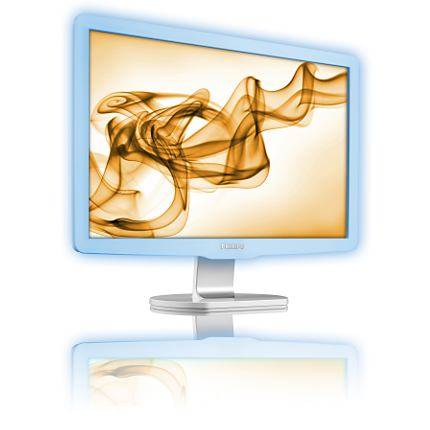
Separating Philips from the light fantastic seems to be a challenge these days, with their Ambilight and Aurea models bringing a little variety to your average black bezeled TV. The Philips Brilliance LCD with Lightframe brings a little of this joy to your computer monitor, with the claim that it reduces eye strain.
The Philips Lightframe monitor is pitched directly to home users and appeals on a number of fronts, the first being design. It's a good monitor to look at, shunning the usual black for white and of course that translucent Lightframe that glows blue when powered on.
Around the back it is white plastic, with clean simple lines that look a though someone visited the Apple School of Design for a little inspiration. The 22-inch monitor sits atop a silver and white stand completing the look. It's an attractive monitor that will complement just about any desk and instantly catches the eye.
That's mostly down to the Lightframe, which has three levels of intensity. Philips claim that the Lightframe "stimulates your visual senses for improved concentration and promotes and overall feeling of well-being". Well, it certainly looks better than using a bland black monitor, but we can't say that we felt the Lightframe did anything other than look pretty.
To be fair, the Lightframe is well controlled. It isn't so bright that it shines in your face, instead it just sits there inoffensively and we found that it was a pleasant monitor to use.
There is one downside to the Lightframe however: interference. We placed the speakers next to the monitor as you might in a typical set-up on your desk and found that the Lightframe caused a audible whine in our speakers. Turn the frame down and it gets quieter, turn it up and it gets louder. Without music on to hide it it's darn annoying. Turn off the Lightframe and away goes the whine, so this issue to consider when laying out your desk.
The stand is a little lightweight. If you have a desk that is a little lightweight, then you might find the monitor wobbles slightly as you type, especially if you have a heavy typing action. The stand gives you 5 degrees forward and 20 degrees backwards tilt to get the levels right, but there is no swivel or rotation into portrait formats.
In terms of connections the monitor features DVI and D-Sub/VGA (cables supplied), so lacks the latest HDMI that some might want. It does have a USB loop though, so you can connect it to your PC and then connect your peripherals directly to the monitor. It only has one USB connection unfortunately, but adding a USB hub is easy enough.
Philips supply SmartControl II software that allows the user to calibrate their monitor, although it is for PC users only. Mac users will find the ICM file on the CD supplied for use with ColorSync Utility, which we found brought a little more punch into the colours over the default profile.
The monitor can be manually adjusted by a range of controls on the right of the frame with easy to navigate on-screen menus.
The manual actually informs users that the monitor is designed to work best at the native resolution of 1680 x 1050 at 60Hz which takes some of the thought out of things. It also means it misses out on the Full HD label, although playback of HD content still looks great on this monitor, be it from a Blu-ray player in a laptop downloaded or from your video camera, although the 16:10 aspect means you'll get black bars on most movies.
The typical contrast ratio is given as 1000:1 although Philips SmartContrast claims to give a dynamic result of 12000:1. The changing levels in SmartContrast might be a little off-putting depending on what you are viewing, but for things like internet browsing and document viewing, you might find it gives whites a boost.
Our quick take
In general it performs well and has plenty of controls to allow for calibration of the monitor through the menus. It is aimed as a home monitor and serves well in that capacity.
The Lightframe makes it distinctive but won't be to all tastes. Equally the lack of HDMI will irritate those who want to use the monitor as a single display for a number of sources. The same may apply to the lack of provision for speakers: both of these features can be found on rival monitors are lower prices.
You pay for the design and get something distinctive as a result; we'd have liked a more inclusive set of features, but we can't help liking the blue glowing frame, even if it does make our speakers whistle.

Philips 220X1SW Brilliance LCD monitor with Lightframe - 3.5 / 5
| FOR | AGAINST |
|---|---|
|
|
To recap
We'd have liked a more inclusive set of features, but we can't help liking the blue glowing frame, even if it does make our speakers whistle