
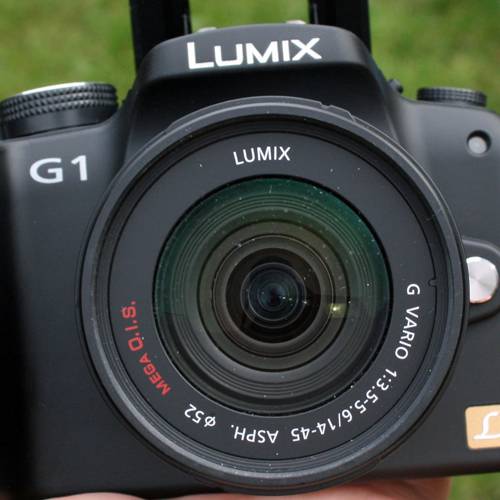
We hesitate to put Panasonic Lumix DMC-G1 in the DSLR category of cameras, because it technically isn't. However, it seems to make sense to place this camera in amongst those that it competes with to an extent in terms of features, performance and price.
In a traditional SLR, you view through the lens, via a prism and mirror which retracts when you snap off a shot. The Micro Four Thirds standard changes that, doing away with those antiquated mechanics and replacing them with a new-fangled electronic system instead. The result is a camera that is substantially smaller, but still has all the benefits of an interchangeable lens camera.
The first concern, of course, is the viewfinder. Electronic viewfinders aren't something you really boast about, especially given the poor quality that appears on many superzoom cameras and camcorders. But the EVF on the G1 is striking. Exquisitely sharp, it will basically give you all the information from the display on the back, making changing settings without moving the camera a breeze. It also gives you a 100% field of view.
The rear 3-inch display is articulated, so you can fold it out and angle it for high- or low-angle shots, or even to line-up self portraits, as well as being able to fold it away so it doesn't get scratched. It's a versatile solution, and with 440k dots, it's sharp enough to use for image previews.
This setup means that, rather than the awkward Live View setup that conventional DLSRs have to adopt, you get the best of both worlds, and it works very well indeed. Both the viewfinder and display benefit from auto switching, so when you put the camera to your face, the screen turns off, and when you move it away again, it switches it back on. Small details like this make the G1 a pleasure to use.
The camera itself looks like a miniature SLR, with the handgrip on the right housing the SD/SDHC card and the battery. The layout of the controls and dials is also pretty regular. It might look a little daunting at first because you effectively have the same control options as an entry-level DSLR, only sitting on a smaller device.
The main shooting mode dial is on the top right and a focus mode dial on the left. The main menu controls lie on the back to the right of the screen, giving you ISO, white balance, AF mode controls, and metering mode controls, with the central menu button opening a more conventional menu, which effectively you don't need when changing shooting options. The Quick Menu on the top gives you access to things like the image size, flash controls, image stabilisation, which would normally be hidden away, which makes it easy to change these options too.
The rear display can also be set to show a Live View image, or all the settings, or simply turned off. To change many of the settings, there is a clickable wheel mounted in the front of the handgrip. Simply click it to select what you want to adjust, and off you go: for example in aperture priority it will change the aperture, as well as exposure compensation.
This set-up of controls and the ease of accessing them does make it much easier to try things you might otherwise avoid, with the added advantage of having a live view of the effect through the viewfinder, making it a great camera to explore photography if you are a learning enthusiast.
Shooting modes start off with Panasonic's iA, or intelligent auto. "Smart" systems can be a little hit and miss, but iA performs very well. It seems to cope with diverse conditions well and is good at identifying the scene and what you are trying to do. You also get the program, aperture, shutter and manual modes, before you get into the scene selections (like you'd find on a compact) as well as portrait, landscape, sports, macro and night.
Some of these mode positions are pretty much rendered unnecessary, because iA often jumps into these modes. We also like the colour position, because you can easily change the colour balance for artistic effect.
Having spent some time with the G1, it's clear to say it behaves very much like an SLR camera when you want it to, and does all the things that you wished your compact camera did. Where as your compact camera will probably fudge it's way through scene selection or destroy low light images with noise, the G1 fares much better, thanks to the proper lens, with plenty of glass to let the light in.
ISO runs up to 3200, but as you turn up the ISO you see it on the screen buzzing away with the top two settings of 1600 and 3200 being distractingly noisy. You can detect the noise at ISO 400 and 800, but for online shots it saves you from the flash in lower light conditions. When shooting in iA it displays the ISO setting as you press the shutter, so you can at least jump in and change things if you see that lighting conditions are too low – perhaps move your subject out of a shadow to get a finer image.
We tested the camera with the 14-45 kit lens (28-90mm, 35mm equiv), a nice compact lens, with a touch of barrel distortion on the wide end, but also featuring Panasonic's Mega Optical Image Stabilisation again making low light or middle zoom shooting just that little bit sharper.
It isn't the fastest lens, f3.5 at the wide end, and with this being a new system of cameras, your options are limited to four specific lenses, but set to expand. Yes, there is a degree of compromise here, but there is an adaptor for Leica M and R mounts, as well as a Four Thirds adapter.
But there are other neat tricks, for example the manual focus will zoom in on your focal point so you can get it perfect at the right spot, rather than guessing from the whole picture. It's an interesting option, again made possible by the Micro Four Thirds format, and can be really useful for producing great detailed shots perfectly.
Generally image quality is very good; colours are bright and natural and in well-lit conditions image detail is good. However, in shadows, particularly with high contrast, detail is lost rapidly (in JPEGs at least) so advanced users may wish to deploy RAW shooting to maximise performance in these conditions.
Focusing is fast and accurate for the most part with plenty of focusing options to get you on target. We did struggle with the chain (see the test images), but on the whole, it’s a pleasure to use. Metering is good, exposure seemed spot on the majority of the time too, but some very bright shots, including some with a flash in the hotshoe, did lead to over exposure on the first pass.
One of the interesting things is how the G1 handles indoor shots without having to increase the ISO much and without resorting to the flash. The OIS helps those slightly longer exposures so you can get a decent shot, something that some entry-level DSLRs don’t do so well.
It is equipped with a mini-HDMI and besoke socket for connection to your TV or PC. We were a little disappointed to find that it wasn't a standard Mini-USB, meaning yet another cable in the bag.
Our quick take
The thing about the G1 is that it encourages you to experiment, with everything really easy to access. Yes, the range of extras might be more restrictive than your DSLR, but if the compact nature of the G1 appeals to you, you might not be looking to weigh yourself down with a huge selection of accessories anyway.
It is expensive, certainly, and the price on the GH1 brother with HD video even more so, but the Micro Four Thirds system does bring with it some inherent advantages you won't get with a traditional DSLR.
For us, we love the compact body and the level of control that you get. We also love the full articulation of the screen: it's a real bonus and helps make the G1 a really fun camera to use.

Panasonic Lumix DMC-G1 digital camera - 4.5 / 5
| FOR | AGAINST |
|---|---|
|
|
To recap
We love the compact body and the level of control that you get. We also love the full articulation of the screen: it's a real bonus and helps make the G1 a really fun camera to use