
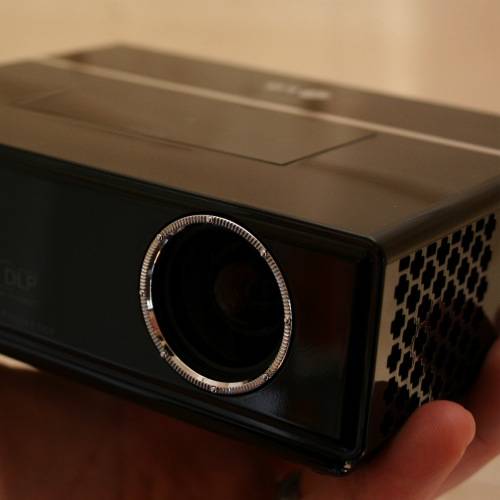
The LG HS102 comes in to replace the HS101 and sits in the category of projectors sandwiched between those which are truly pocketable and fully-fledged but compact home devices. The result is a device that lends itself to portability whilst still being able to produce an image you could conceivably use to present your latest business pitch. But does the HS102 meet this remit?
Our quick take
The compromise you have to accept for getting a small projector is that the performance suffers. As a result you are left with a device that is only really suited to business users, with the price of £550 being more than some respectable projectors more suited to home use. The overall image quality here does leave a little to be desired alongside similar spec competition.
The extras bundled into this package, however, do make it appealing for someone who needs to travel light. If you are giving a verbal presentation, for example, you don't even need a notebook - the files on a USB to back you up will do the job.
The HS102 wins points on the options it gives you, but unfortunately loses them for the final projection quality.

LG HS102 ultra mobile projector - 3.5 / 5
| FOR | AGAINST |
|---|---|
|
|
Measuring only 154 x 117 x 50mm, it is slightly larger than it's Acer rival, the K10, and is also an LED DLP arrangement but packs in a number of features not found on that device. Around the back is where the action is at, and you'll find a range of connection options, including VGA for hooking up directly to most notebooks or PCs, whilst you also get a 3.5mm AV in, an audio out and a USB slot. A Kensington slot gives you the option to secure it.
You get a host of cables in the box, including a standard VGA cable and the AV cable (both about 2m long) you'd need to bring video and audio in, as well as a converter to allow you to take a component video source and convert it to VGA. These options should cater for most, meaning you'll be able to connect up to a variety of video playback devices without too many problems, assuming they have RCA type outputs.
Control of the projector is via a touch-sensitive panel on the top which glows red. A corresponding beep is issued when touched, although if you are pressing and holding to adjust a value this incessant beeping may well drive you mad, so it is worth turning it off. The controls are responsive enough, but as is often the case, you'll sometimes get a beep and no response, so turn off the beeps and use your eyes to guide you.
Alternatively there is a small remote control bundled in the box which is a welcome addition, meaning you can sit behind the projector and change the settings at your leisure.
On the bottom there is a standard screw thread for attaching to a tripod and given the size of the unit, this often presents the easiest method of siting it without too much messing around. Focusing is handled by manually turning the ring surrounding the lens on the front, with small knurls providing a little purchase for performing this task. It is a bit fiddly, but works well enough. You also get options for horizontal and vertical flip, so you'd be able to ceiling mount, or rear-project or both. Keystone adjustment is available through the menu or via the remote.
The native resolution of the projector is 800 x 600 (SVGA) which will usually give the best results in a 4:3 format, although you can also switch to 16:9 if you prefer. It will support a range of input resolutions up to 1280 x 1024 (SXGA) from your PC, as well as formats up to 1080i from an external video source, although LG recommend 720p for the best result.
One of the most interesting aspects of the HS102 is the support for USB, which opens up a range of possibilities - if you are organised - so you don't necessarily need anything other than a USB drive. Insert a USB drive and a basic navigation screen is shown, giving you access to photos, music or movies. A few button presses and you can be showing a slideshow of photos, playing a video clip to support your presentation, or play an audio track.
It is a fairly basic file and folder navigation option and you will need the remote control to be able to effectively operate the projector in this mode. In each section it will only display the file types that are supported, so if you are in the photo section, it won't show you the music files and so on. File support is limited, in that you'll only be able to access JPEG, MP3 and DivX files, but at the same time, these are convenient formats for on the fly presentations.
The supplied remote control gives you playback controls so you can stop and start, or pause, playback, or pull up subtitles and so on if your DivX file contains any.
The maximum size projection is given as 80-inches, from a distance of 2.2m. This only really works in darkness, otherwise the projector doesn't really have the power to be effective. If you can shut blinds and turn off the lights then fine, but in an average boardroom, you might find you can't see anything. We found a distance of about 1.3m, giving a 50-inch projection, achieved some of the best results.
With a rating of 160 ANSI-Lumens and with a contrast ratio of 2000:1 this won't be a contender for your home cinema setup. You'll find that your projections are a little lacking in brightness as mentioned above and that colours don't really jump out. We also found that projections from all sources were very pixellated, not as fine as the image projected by the Acer K10 for example.
An advantage that the HS102 has over that rival projector is the inclusion of a speaker, meaning that this really does work as a standalone device. The sound performance isn't great, but equal to most notebooks and there is a volume control on the remote too, as well as a mute button. If you do want a little more, you can use the audio out to connect another audio device, but that sort of defies the point of travelling light in the first place. Alternatively, you could plug in headphones.
Startup and shutdown is also relatively fast, with the projector powering off within about 10 seconds of the double press of the power button.
To recap
The HS102 wins points on the options it gives you, but unfortunately loses them for the final projection quality