
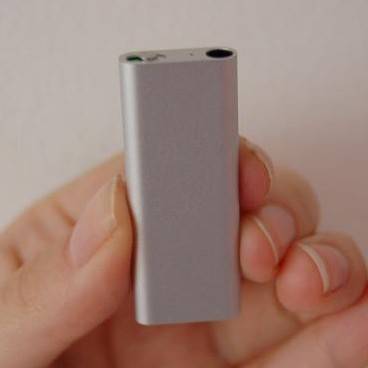
Apple has always strived to be The Ultimate in Adjectives, be it the smallest, slickest, largest, and who could forget with the latest touch, funnest. With each previous model of the iPod shuffle, they produced the smallest MP3 player, only to have the title stolen by the likes of iRiver at a later date. With this third generation of the product they’ve regained their tiny MP3 crown.
You can’t help but be impressed by the size - it’s half the size of the previous model, whilst it doubles the storage of the previous model, bumping it to 4GB, or 1000 songs. Again, like the previous model, it incorporates a stainless steel clip for fixing to clothing and whilst it attracts fingerprints like mad, it does give it a quality feel and contrasts nicely to the anodised aluminium casing of the rest of the shuffle.
On the top, there’s a switch for turning the player on, having it play songs alphabetically, or shuffling them, creating three possible positions across the indent. Positioned as it is, next to the headphone input, it’s incredibly fiddly to use. It’s far easier just to pause the headphones using the in-ear controls than it is to flick the switch to the off position.
In an effort to further streamline the look of the player, the main controls have all been moved to the headphone cable. iPhone users will be familiar with this interface, since it’s similar to that which is used not only to take calls, but to fast forward and pause tracks. Clicking the small tube once, which is positioned between the right ear bud and where the two cables join, will pause the song, whilst double clicking it will move you on to the next track. There’s also volume controls in the same place, as there are in the headphones Apple announced last year.
With a casing the size of your little finger, there’s no room for incorporating a screen for viewing your music selections. Even if Apple squeezed it in, they’d have to supply an iMagnifyGlass to see it. Instead, a new feature called VoiceOver has been incorporated, to give you a better stab at finding music to suit your mood.
Again, the control of this falls to the in-line module. Holding down the module will activate VoiceOver, which will announce the song title and artist. Keeping it depressed, you’ll hear a beep after which it will start reading out the names of your playlists in alphabetical order.
Should VoiceOver not be to your taste, there’s a box in iTunes you can uncheck to disable it, and the first time you synch, you’ll be asked whether you want to activate it. Perhaps one reason for doing so is the choice of voices, or lack thereof. Whilst Mac users running OSX get “Chris”, part of the text to voice software that is already installed, PC users have to install a package the first time they synch the shuffle, and the resulting voice is even more robotic.
Essentially, neither voices sound natural, but this is because they’re analysing and translating the exact metadata of each song and playlist, rather than harvesting it from iTunes. That means you can change what is read out simply by changing the details of the song (a fact that makes it very difficult to resist the temptation of calling all your songs by ridiculous and profanity-ridden names).
What the VoiceOver won’t do is take up lots of valuable storage space. The 1000 song capacity quoted includes VoiceOver data, and a spokesperson estimated that it was less than 1% of the total space needed for each song. The same technology will warn you when your battery gets low, or quote you the exact battery life if you flick the shuffle switch on the top from left to right and back (good luck with that: it really is that fiddly).
On first glance, it’s easy to look at the VoiceOver feature as a gimmick, but it’s surprising how useful it is. The chance to store more than one playlist is a first for the shuffle, and it’s a nice addition. Added to that the chance to find out what song’s playing without having to reach for the player, and you can see that it could potentially be a feature that could be rolled out to other players in the future. Indeed, Apple told us they were keen to hear how it was received by consumers so they could judge whether this would be worthwhile.
Anyone with any regard for the quality of their music will be aghast at the idea of using the headphones supplied by Apple, but with the in-line controls, you’re more restricted than you would be with previous iPods. Whilst Apple have no plans for adaptors, there are, thankfully, already third party manufacturers who are making their own high quality headphones with the controls incorporated.
Synching and charging the device comes via the supplied USB lead, which is just 3in long. Should you need a longer one, that’s an accessory to be purchased separately from Apple. Battery life has taken a slight hit, due to the size of the new shuffle, now standing at 10 hours. A full charge takes 3 hours.
Our quick take
The new shuffle retails for £59 and when you consider it holds as many songs as the very first iPod did, it doesn’t seem such a bad deal. Apple is going to continue to sell the 1GB older clip shuffle for £31.
One thing the new model is missing the rainbow of colours that the smaller iPods have become known for, but whilst this will possibly upset certain consumers, selling it only in silver and black does add a more sophisticated air to what is essentially a pretty cheap MP3 player.

Apple iPod shuffle 3rd generation - 3.5 / 5
| FOR | AGAINST |
|---|---|
|
|
To recap
It’s hard not be to taken in by the proportions and design of the new shuffle - it’s like a highly covetable techno tie clip