
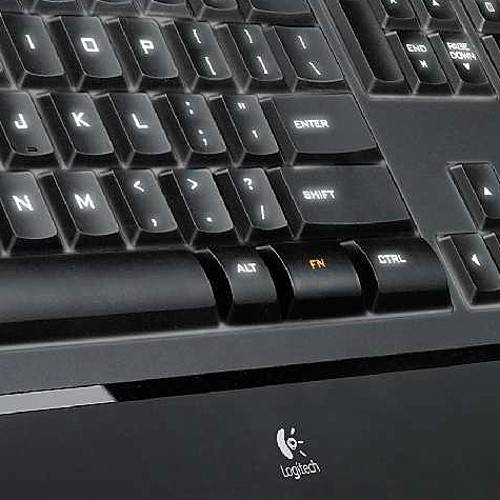
Your keyboard and mouse are the parts of your PC that you spend most of the time in contact with, so it’s worth seeking out the solution to make your computer time, be it work or leisure, as comfortable and productive as possible. But does the backlit keyboard from Logitech appeal?
From the outset the quality of construction stands out on this keyboard. It looks and feels worth every penny you pay for it. With an ultra-thin design - only 9.3mm - and good quality materials used throughout, this keyboard won’t look out of place paired up with any premium PC. Some might not like the fact that it is wired, but with backlighting drawing power, you probably don’t want a wireless option.
A quick install of the software is needed to enable the additional shortcut keys, but rather than bloat the keyboard surface with additional keys, they take the form of Fn shortcuts, rather like a notebook. The software allows you to customise these keys, and you can enable the functions by default, meaning you have to press the Fn key to then use the original F keys. This isn’t really a practical solution if you are a heavy shortcut user, for example in Word, which would entail holding down three keys, rather than the normal two.
Shortcut buttons give you the normal browser and email options, but is optimised for Vista, so if you want to re-programme that Aero option you’ll need the software installed. You also get a search shortcut, calculator, and media player options, amongst others. There are a few non-Fn shortcuts, which include mute, volume and backlight adjustment. The decision to break these out from the Fn set is to be applauded, as mute is something you often need to jab at when you snatch up the phone.
The typing action is very good. A quality, satisfying, feeling which lends itself to fast keyboard work. Rather like a laptop keyboard the keys are low profile with just enough travel, so those moving over from a notebook will have no trouble getting straight into typing. Besides the standard QWERTY keys, you have the normal central section with cursor keys and a pager navigation cluster, including a nice big delete key, making word processing a speedy option. You also get a full number pad on the right.
With a keyboard this slim, it doesn’t sit too high on your desk, but does have two small feet to lift the rear and make typing more comfortable. The front has a tactile palm support, nice and warm to the touch and comfortable for long periods of use. The front of the keyboard did highlight perhaps the only flaw that we could detect, which was a small degree of flex. In fact, this flex was due to a slight bowing of the keyboard, so when your hands are placed on the keyboard, it flexes to rest on the central supporting rubber foot.
But the big highlight (geddit?) of this keyboard is the backlit keys, a feature that Mac and Sony Vaio users will have become familiar with. In this case you are give several different settings to suit your environment, but the backlighting makes typing in darkness an absolute breeze. Why would you want this? Well, sometimes you just do!
The backlighting come to the fore as daylight fades and you find yourself looking at the slick keys and appreciating them. The lighting also looks to be even across all the keys - too often the peripheries are neglected, but again, the quality here shines through (groan).
Our quick take
As far as typing goes good keyboards are a pleasure to use, and the Logitech Illuminated Keyboard instantly appealed to us. It’s design makes it a natural choice for anyone moving over from a notebook keyboard, whether this is hooked up to your docking station or desktop unit.
The backlighting might add nothing for the office worker under plenty of lighting, but for a home user it means you can play in low light with no keyboard problems.
At £50, it might seem expensive, but it’s worth every penny.

Logitech Illuminated Keyboard - 4.5 / 5
| FOR | AGAINST |
|---|---|
|
|
To recap
A pleasure to use. It might seem expensive at £50, but it is worth every penny