23 May 2008 16:00 GMT / By Stephen Patrick
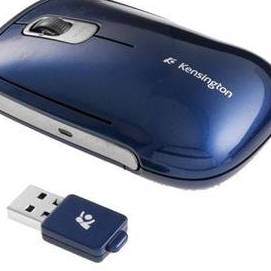
Kensington's SlimBlade range of accessories covers all aspects of computer peripherals and this mouse also doubles as a professional presentation tool.It’s an attractive device finished in metallic blue plastic. The smooth design feels like a pebble in your hand and is comfortable. The two mouse buttons are a good size but the scroll wheel proved a little small.
It connects to your notebook or PC wirelessly and you'll find the USB dongle hidden away in the side of the mouse. As soon as you eject it, the mouse is switched on and only powers down when the dongle is returned. A small LED on the side of the mouse highlights how much juice is left in the batteries, with green being plenty, while red means replace.
Simply inserting the device into your computer is enough to load the drivers and we even found that it instantly worked on an Asus Eee PC loaded with Linux, so this is a good multi-purpose device. We found it to be rather sensitive and needed to recalibrate to make the most of it.
When it comes to being used for presentations you'll find it only works with Windows XP and Vista and you'll need to install the tools from the provided CD-ROM. A button below the scroll wheel switches into presentation mode and the mouse buttons allow you to move your slides forward and back.
Verdict
The Kensington SlimBlade Presenter Mouse is certainly something different and if you regularly use your notebook for giving presentations, this makes a great portable device to add to your kit.
Score
Review Recap
- Made by
- Kensington
- Price as reviewed
- £32
- Latest price
- Compare prices
- The good
- Nice design, set-up is easy
- The bad
- Can't recharge batteries, overly sensitive
- Quick verdict
- Combining a notebook mouse and presentation tool in one is a novel and space-saving approach that works surprisingly well
- Score
-
Recommended articles
Hardware, Mice And Keyboards, Mice, Kensington, Kensington SlimBlade Presenter Mouse


Is Facebook about to buy Opera to create own Facebook browser? EXCLUSIVE: Pocket-lint source tells us "yes"
Which smartphone is best for the sun? Screens for the Summer
Batman Nokia Lumia 900: Limited edition phone heading to UK Who are you? I'm Batman
Jony Ive: Next Apple product is our most important and best work yet Better than iPod, iPad and iPhone?
Dragon's Dogma Adventure time
Tom Clancy’s Ghost Recon: Future Soldier Roger likes a Tango at 12 o'clock
Canon EOS 5D MK III It's a hat-trick
Porsche 911 Carrera (991) 2012 pictures and hands-on WANT
Robert Moog Google doodle best yet, even better than Les Paul Synthesizer synthesiser
Microsoft Office coming to iPad and Android tablets this November A change of heart?
APP OF THE DAY: Mini Motor review (Android, iPhone and iPad) Top-down. Top app.
Toshiba AT300: The quad-core 10.1-inch ICS Android tablet UPDATE: Pricing unveiled
Sega serves up Virtua Tennis Challenge on the iPad and iPhone Smash-ing
APP OF THE DAY: Wyse PocketCloud Remote (Android) Work on your PC from anywhere in the world
Free Wi-Fi? Then give us your dog poo Dirt cheap
Olympus OM-D E-M5 review
The compact system camera to beat all others?
Nokia Lumia 900 review
Is big beautiful?
HTC One V review
V for victory?
FIFA 12: UEFA Euro 2012 review
Lacks polish, if not the Polish
Huawei Ascend G300 review
Big bang for your hundred quid
Asus Transformer Pad TF300T review
Transforms your money in to a great tablet
Nikon Coolpix P510 review
Does the P510 zoom beyond expectations?
Fujifilm X-Pro1 review
Like a Leica
Volkswagen Beetle Design 1.2TSi DSG review
The bug is back. Again.
BlackBerry Curve 9320 review
A BB for beginners?
Fujifilm FinePix HS30EXR review
Can Fujifilm’s latest put the ‘super’ in superzoom?
HP Envy 14 Spectre review
The Ultrabook that isn't an Ultrabook
The Walking Dead: The Game review
Fleshed out zombie bonanza
Sony Cyber-shot HX200V review
Superzoom master keeps the bar high