
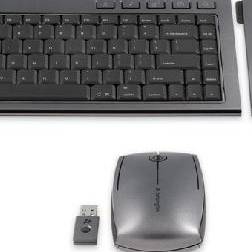
Kensington has designed its latest range of media sets with notebook owners in mind. The set consists of three elements: full-sized keyboard, a mouse and a numeric keypad. Connecting wirelessly, the idea is that you can leave the unit on your desk but it straight away connects when sat at your desk.
As the name suggests, the design is slim and manages to pack a full-sized keyboard into as little space as possible. The numeric pad can be attached to either side of the main body, so can be used by gamers as well as number crunchers.
To remind you this is for use with your notebook, the keys are flat with minimal travel, as you’d find on a standard notebook. You won’t find any media buttons and the design means it lies rather flat on the desk, which means it lacks a certain ergonomic design.
The same wireless dongle that connects the keyboard and number pad to your notebook also controls the mouse and can be stored away inside it when not needed. The mouse is long and slim and can easily be taken with you on the move. It has a rubber edge and feels good in the hand.
You don’t need to install any drivers to use the mouse on other devices, but installing the supplied software means you’ll be able to fine tune the controls.
Our quick take
The Kensington SlimBlade Media isn’t the most roust of kits but it’s got an attractive design and the keyboard is solid enough to see you through many a late-night project.

Kensington SlimBlade Media Notebook Set - 3.5 / 5
| FOR | AGAINST |
|---|---|
|
|
To recap
Designed for notebook users to use in the office, this is a great looking piece of kit but it’s not the most ergonomic design