
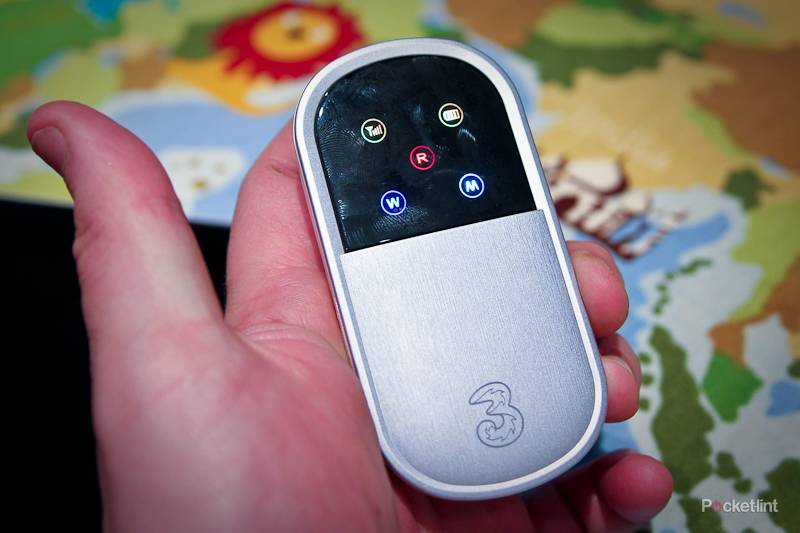
Mobile broadband USB dongles have come on leaps and bounds since they first appeared a couple of years ago, but what if you haven't got a USB socket to plug them into? How do you get your device to connect to the Internet then? 3, the UK mobile phone operator, is hoping that its Mi-Fi mobile Wi-Fi offering will allow you to get your device connected without the worry of working out how to plug it in.
Our quick take
With varying price options that offer you a Pay-As-You-Go as well as traditional monthly contract variant, this is a great idea if you're looking to get that new iPad or other device connected to the Internet.
Currently that price is £7.50 a month for 1GB of data over an 18-month contract, or £69.99 up front and 3GB of data to get you started that has to be used up in the first 3 months.
While the iPad will come in a 3G compatible version, a device like the Huawei modem will allow your other devices to benefit as well. Something that could and probably will prove more useful in the long run.

3 Mi-Fi Mobile Wi-Fi (Huawei E5830) - 4.0 / 5
| FOR | AGAINST |
|---|---|
|
|
The modem, which looks like a small silver pebble, works by creating a wireless hotspot and then connecting to the 3 mobile phone network, allowing you to surf the Internet on any device that has Wi-Fi connectivity - as long as you've got 3 coverage. That means laptops, netbooks, but more importantly iPods, iPads, Eye-Fi SD cards, PSPs and a stack of other devices, gadgets, and gizmos will be made available.

At first glance the device is fairly nondescript in looks. The unit comes with a series of buttons down one side, a USB connector socket at the base of the unit and that's about it. It's simple, because it doesn't need to be anything else.
Turn it on and the black screen comes to life with five different icons hoping to tell you what's what. There is one for the power, one for the connectivity status, one for the signal, one for whether you've got the Wi-Fi element turned on and finally one to tell you that you're roaming, although surely having left the country you'd know that already.
The icons themselves have different colours for different status alerts and to begin with you'll have to consult the manual to work out what it all means. While we can understand that a red aerial means that you can't access the 3 network (yet you still can), we aren't sure why a light blue "M" means you are surfing at a faster speed than dark blue "M", but there you go.

Down the side are three small buttons: power, connect, and Wi-Fi with the latter allowing you to turn the wireless connectivity on and off to conserve battery power.
Although the unit can be run from a USB cable included in the box, a benefit of the Huawei E5830 is the ability to run it from the built-in battery. That allows you to use it with any Wi-Fi-enabled device rather than just those that have a USB socket to power it from.
Turn it on, find the network, and then press the connect button, it really is that simple. Getting your device to connect to the created Wi-Fi hotspot is as easy as punching in a password (shipped with the device) and then you can connect one or more devices (up to five in fact) to the network.

The ability to connect multiple devices means that you can share your newly created connection with devices you or your colleagues own, as long as you are within 3 coverage. We had no problems connecting devices to get access to the Internet, and there is really no software to install either.
On the performance front it comes down to a number of factors. Accessing the Internet is down to the strength of the signal you can achieve, while the more devices vying for that connection will also slow things down a bit. Needless to say in our tests the results were all positive. We struggled to get a connection in our Ascot office, however in central London it proved no problem at all.
Battery life was also good although it depends on how good the signal strength is and how hard the device has to work to keep you connected. You can always run it while it's plugged in if that's a worry on long day excursions.

Where the product really impressed however, was the ability for us to connect it to devices that didn't have a USB socket. That for us meant an iPad (saves you having to buy the 3G version) and an Eye-Fi card allowing us to save pictures to Flickr, Facebook, MobileMe and an FTP server without having to have a computer on.
It's great for a party for example where friends can track the fun and games without you having to worry about whether the bar has a Wi-Fi hotspot or someone loading up images on a laptop in a backroom.
To recap
A simple device that will give you a Wi-Fi network on the fly so you can stay connected - but there is an ongoing cost for mobile data to consider